






Skip to content Skip to footer

Manage requests, processes, and SLAs with efficiency and traceability

From initial report to final resolution: workflows, e-mail and PEC inbound import,
intelligent routing, KPIs, and integrations—all in a single platform.

How Desk works?

Powerful Automation. Effortless Operations.

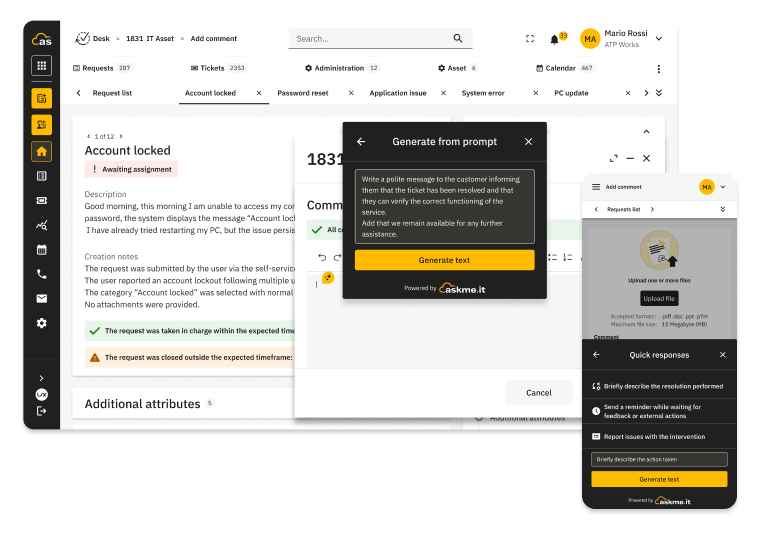
Boost your team’s efficiency with our intuitive, AI-integrated platform. From initial request to final resolution, centralize your workflows and track every step effortlessly.  


Why Choose Desk?

Faster results, higher quality

Boost your team’s productivity and service quality while significantly lowering operational costs.

SLAs under control

Manage priorities, business hours, escalation workflows, and alerts with precision—no more surprises.

End-to-end visibility

Leverage real-time dashboards, KPIs, and reporting to support better, data-driven decision-making.

Standardized responses

Maintain consistency with AI-driven suggestions powered by your internal knowledge base.

Seamless integration

Connect effortlessly with your existing CRM, ERP, or ITSM systems.

Compliance & Security

Ensure peace of mind with full traceability of all interactions and system changes.

Everything You Can Achieve with Desk

Manage Requests

Track every interaction from start to finish with full system traceability.

Automate Workflows

Design visual processes, trigger automatic actions, and manage escalations effortlessly, e-mail and PEC import and classification.

Measure & Optimize

Use live dashboards and custom KPIs to track SLAs and service hours.

Offer Self-Service

Let users find their own solutions with a responsive portal and smart search.

Schedule & Inventory

Manage CI/CMDB assets and recurring tasks from one central calendar.

Designed to Integrate

Looking for a specific technology? Contact our team, and we’ll help you find the perfect fit for your infrastructure.

Use Cases

Find your context. Let’s get started.

Hiring Process Automation

Explore how Agentic AI accelerates talent selection, screening, and onboarding. Automate CV screening, coordinate interviews, and simplify the entire hiring journey through autonomous intelligence.

Case Management

Discover how Askme simplifies customer verification and onboarding. Automate document collection, identity verification, and account opening management, reducing time and friction.

Onboarding

Discover how Askme simplifies customer verification and onboarding. Automate document collection, identity verification, and account opening management, reducing time and friction.

Askme Desk FAQ

What is Askme Desk?

Askme Desk is Askme’s service management, ticketing and workflow module. It centralises requests, reports and cases in a single space, takes them from first report to resolution with full traceability, and automates assignments, processes and SLA monitoring through built-in artificial intelligence.

What can I manage with Desk?

Desk covers the full service lifecycle: request and ticket handling, workflows and automations, SLA, KPI and report monitoring, a self-service portal with a knowledge base, plus asset and scheduling management (CI/CMDB, inventory, recurring tasks and an operational calendar). It is a single environment to centralise and standardise the management of all your services.

How does it automate workflows?

With a visual designer you can build processes in minutes, without writing code. Desk handles automatic actions, escalation rules, OLAs and the import and processing of incoming requests, routing work to the right person or team based on skills and workload.

How does it manage SLAs, priorities and escalation?

Desk keeps SLAs under control with priorities, service hours, escalation rules and automatic alerts, so there are no surprises. Real-time dashboards, KPIs and custom reports give end-to-end visibility into team performance and support better decisions.

Can it automatically process inbound e-mail and certified e-mail (PEC)?

Yes. Desk imports and processes inbound e-mail and PEC, turning them into tracked requests with automatic assignment and follow-up. This is especially useful for teams that receive high volumes of communications across different channels and want to consolidate them into a single governed queue.

What role does artificial intelligence play in Desk?

The built-in AI agent supports operators in their daily work: it classifies and routes requests, suggests answers based on the knowledge base and standardises response quality. The team stays in control while the AI reduces manual work and resolution times.

Which channels does it collect requests from?

Desk is multichannel: it gathers requests from e-mail, web, chat and phone in a single dashboard. Together with Askme Chat, you can cover the whole journey from the first conversation to ticket resolution.

Does it integrate with the systems we already use (CRM, ERP, ITSM)?

Yes. Desk integrates smoothly with leading CRM, ERP and ITSM systems and with tools such as Microsoft 365, Jira, SAP, Twilio, Wildix and LimeSurvey. For specific needs, open APIs are available for custom integrations.

How are security, traceability and compliance ensured?

Every interaction and change is fully tracked, supporting audit and compliance. Desk inherits Askme’s enterprise security standards, with data encryption, access control and the option to keep data in data centres in Italy.

Which certifications does Askme Desk have?

Desk is part of the Askme solution, certified to ISO 9001 (quality), ISO 14001 (environment) and ISO/IEC 27001 (information security), and GDPR-compliant. Askme is also qualified on the ACN marketplace, so public-sector organisations can adopt it with the security and reliability guarantees of the national cloud.

Is it available in white-label mode?

Yes. Desk can be customised and branded in white-label mode: the interface, colours and logo align with your identity, giving operators and users an experience consistent with your brand.

Can I adopt only Desk, or is it better alongside the other modules?

You can start with Desk and expand whenever you want. It works on its own, but its value grows in combination with the other modules: with Chat you cover request and resolution end to end, and with Sign you add signatures and approvals to your flows.

How configurable is it, and how long does it take to go live?

Desk is fully configurable and adapts to each organisation’s specific processes, without redesigning existing systems. The visual editor lets you start quickly, and dedicated support guides the team through the first configurations.

What results can I expect with Desk?

Organisations adopting Desk handle up to 3 times more requests per operator, see user satisfaction rise by around 45% and cut ticket resolution times by roughly 50%, lowering costs while improving service quality.

Overwhelmed by complex processes? 
Just Askme

Close
Close
Available Conversation Modes
The way conversations are handled depends on the level of human involvement and AI integration. Below are the available options, ranging from purely manual control to fully automated solutions, including various hybrid and AI-assisted approaches.
Full Human Managed
Conversations are managed entirely by a human operator, from creation to resolution.
AI-Enhanced Managed
Conversations are guided by pre-coded, navigable procedures powered by intent detection.
Full AI Managed
Conversations are handled end-to-end by the virtual agent.
AI Hybrid Mode
Conversations are managed using a hybrid approach, combining automated response generation with intent-based navigation for configured flow segments.
AI / Human Managed
Conversations are managed in a hybrid mode, with the capability to perform a seamless handoff to a human agent triggered by specific intent detection.